
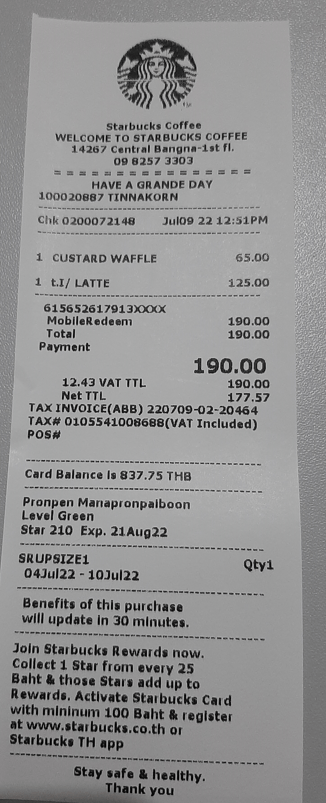
ในบทความนี้ เราจะสร้าง custom prompt เพื่อ extract ข้อมูลจากใบเสร็จแล้วไปกรอกข้อมูลใน Excel
ไปที่ Power Automate คลิก ‘AI prompts’ แล้วกด ‘Build your own prompt’

คลิก ‘Input’ ทางด้านขวามือ แล้วกดปุ่ม ‘Add input’
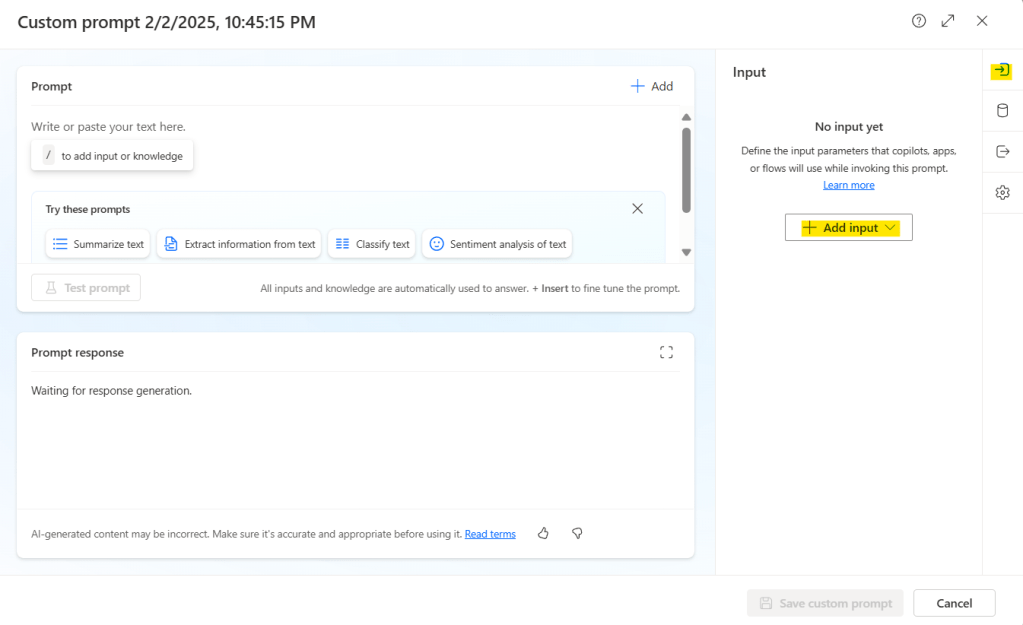
เลือกประเภทของ input ว่าเป็น Text หรือ Image or document ในที่นี้จะเลือกเป็น ‘Image or document (preview)’ แล้ว AI model จะเปลี่ยนเป็น GPT-4o อัตโนมัติ

ตั้งชื่อตัวแปร แล้วเขียน prompt โดยใช้ข้อความร่วมกับตัวแปร ตัวอย่างเช่น ถ้าตั้งชื่อตัวแปรว่า “image” สามารถเขียน prompt ได้ ดังนี้:
Extract the relevant data from the receipt: {image}ถ้าตั้งชื่อตัวแปรว่า “entity” สามารถเขียน prompt ได้ ดังนี้:
Extract the following data fields from the receipt {entity} :
Store Name, Store Address, Contact Number, Date and Time, Transaction ID, Total Amount, VAT Amount, Payment Method, Item List for each item which consist of: Item Name, Quantity, Price

Output the extracted data in JSON format

For example:
{
 ""extracted_data"": {
  ""[entity 1]"": {""value"": [extracted value], ""type"": ""[data type]""},
  ""[entity 2]"": {""value"": [extracted value], ""type"": ""[data type]""},
  // Continue listing additional entities with their values and data types
  ...
 }
}
อัพโหลดรูปภาพหรือเอกสาร แล้วกด ‘Test prompt’ แล้วตรวจสอบ prompt response

ไปที่ tab ‘Output’ ทางด้านขวามือ แล้วเลือก ‘JSON’ จากนั้น test prompt แล้วอัพโหลดไฟล์ แล้วตรวจสอบ prompt response

ถ้า prompt response ได้ผลอย่างที่ต้องการแล้ว กดปุ่ม ‘Save custom prompt’
Create flow
- ใช้ manually trigger a flow (เพื่อทดสอบแบบเร็วๆ)

2. ใช้ ‘Create text with GPT using a prompt’
- เลือก custom prompt ที่สร้างไว้
- เพิ่ม dynamic content ‘Receipt content byte’ จาก trigger ก่อนหน้า

3. ใช้ ‘Add a row into a table’
- เลือก ‘Location’
- เลือก ‘Document Library’
- เลือก ‘File’
- เลือก ‘Table’ (Excel table)
- ใส่ dynamic content ‘Date and Time value’ จาก action ก่อนหน้า
- ใส่ dynamic content ‘Item List Item Name’ จาก action ก่อนหน้า
- ใส่ dynamic content ‘Item Quantity value’ จาก action ก่อนหน้า
- ใส่ dynamic content ‘Item Price value’ จาก action ก่อนหน้า

Test Flow
รัน flow แล้ว upload รูปภาพ


 PenBot_RPA
Leave a comment