


Sometimes, when we copy a URL from a website, it encodes characters with % symbols, which Power Automate Desktop interprets as variables.
For Example:

https://th.wikipedia.org/wiki/ภาษาไทย

Encoded as:

https://th.wikipedia.org/wiki/%E0%B8%A0%E0%B8%B2%E0%B8%A9%E0%B8%B2%E0%B9%84%E0%B8%97%E0%B8%A2
There are 4 ways to solve Parameter ‘Initial URL’: Syntax error
- Use authority as Initial URL
- Partial copy URL, and combine it together as Initial URL
- Hardcoded values the URL in variable
- Escaped using another percentage character (%%)
Use authority as Initial URL
If you copy authority in URL, it won’t encode character % symbols so you can use it as Initial URL in Launch new Chrome action.
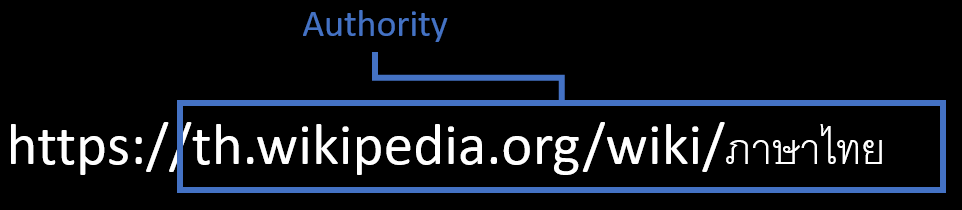

Partial copy URL
Partial copy scheme, subdomain and domain, then copy path, and combine it together as Initial URL.
This method won’t encode character % symbols so you can use it as Initial URL in Launch new Chrome action.


Hardcoded values
To include a hardcoded text value within a variable, enclose it in quotes. Any value between the quotation marks will be treated as text and not as a variable name
Therefore, you can copy URL directly and paste it in percent symbol and quotation mark like %’URL’%, then use this variable as Initial URL in Launch new Chrome action.


Escaped using another percentage character
To prevent Power Automate Desktop from interpreting % symbols as variables, escape them by using a double percentage sign (%%).
Tips
You can paste encoded URL in text editor or Excel and use replace % with %%

You can copy code of this article from my github and paste it in the Power Automate Desktop’s workspace
Hope this help 😉
 PenBot_RPA
Leave a comment